What are loose carbs?
Loose carbs is how you log carbs by hand, typing the grams directly, without searching the food database. It's handy when you already know (or can estimate) how many grams of carbs are in what you're about to eat.
Entering the grams is free. Adding a description, entering calories, reading the label, and saving as a food are part of Diablesse Pro.
How to add loose carbs
- In the Diary, tap + to open a new entry.
- Scroll to the Loose carbs card.
- Under Carbohydrates, type the grams.
- If you like, fill in the Description (optional) and the Calories.
- Tap Add. The item joins the meal list.
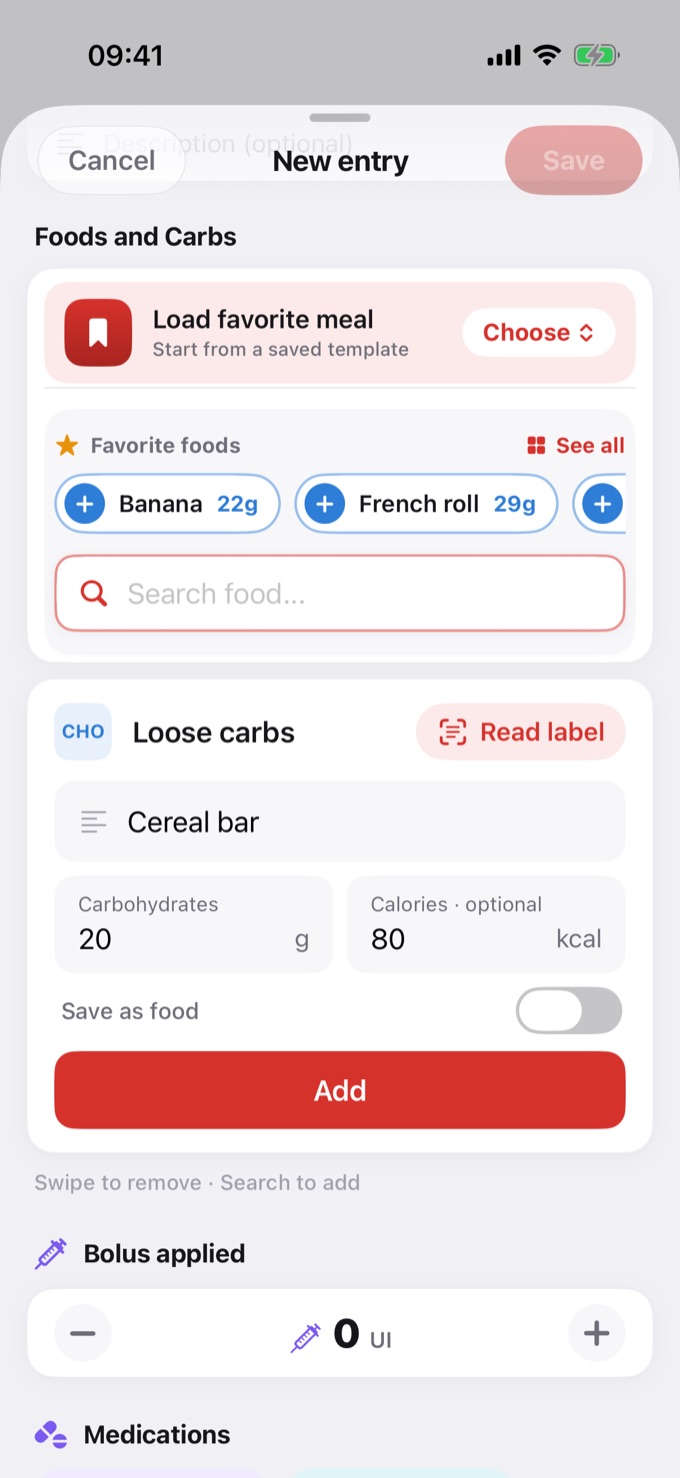
Give it a description (name)
The description becomes the item's title in the meal list, instead of the generic "Loose carbs". So when you review your diary later, you instantly recognize what that carb was.
- With a description: the item shows the name you gave it (e.g., "Cereal bar").
- Without a description: the item shows as "Loose carbs", with the subtitle "added manually".
Calories are optional. If you leave them blank, the app estimates the calories from the carbs.
Read the label
Instead of typing, you can read the values straight from the nutrition facts label on the package:
- In the Loose carbs card, tap Read label and choose Camera or Library.
- On the How much to log? screen, check the Values read from the label: serving, carbs, and calories. A value with a yellow background needs checking. If something is wrong, tap Correct values read.
- Under Amount, enter how many servings you're logging (half servings work too) or the amount in grams. The total appears at the bottom.
- Tap Add. The carbs and calories fill in the card. Review them, add a description if you want, and tap Add in the card.
Without Pro, the Read label button shows in gray with a lock. The reading happens on your phone and the photo is not kept. Learn more in Create a food and read the label.
Save it as a food to reuse
Ate something that isn't in the database and will eat it again? Save it as your food and skip retyping it next time.
- In the Loose carbs card, enter the Carbohydrates.
- Fill in the Description. That's what enables saving.
- Turn on Save as food.
- Tap Add.
Done: the item becomes your food. It now shows up in Favorite foods and in search; next time, just look it up by name.
Came from a label? If the values were filled in by reading the label and you didn't change them, the food is saved with the original table (one serving from the label), not with the total you logged. That way, next time you choose the amount again. If you changed the values, what's in the fields is saved.
The saved food is personal: it stays in your account and syncs across your devices. It does not go into the app's public food database.
Free vs Pro
Free
- Enter the grams of carbs
Pro
- Give the item a description (name)
- Enter the calories (or let the app estimate)
- Read the label with the camera or from your photos
- Save as a food
Frequently asked questions
Do I need to save it to use the description? No. The description works on its own: it becomes the item's title in the meal list. Saving is one extra step, so you can reuse the food later.
Does my saved food go into the app's public database? No. It's personal: it stays in your account and syncs across your devices. No one else sees your saved foods.
Do I have to enter the calories? It's not required. If you leave them blank, the app estimates the calories from the carbs.
What happens if I cancel Pro? The foods you saved are not deleted. They become unavailable while the subscription is inactive and come back if you resubscribe.