Backup and data restore
Cloud sync
- iPhone: your data lives in your private iCloud account and syncs on its own across your Apple devices.
- Android: Cloud sync is optional and off by default. Turn it on in Settings → Cloud sync, signing in with your Google account. It's a Diablesse Pro feature.
You can also create a manual backup: a file with your data, to keep an extra copy or move to another phone. Manual backup is free.
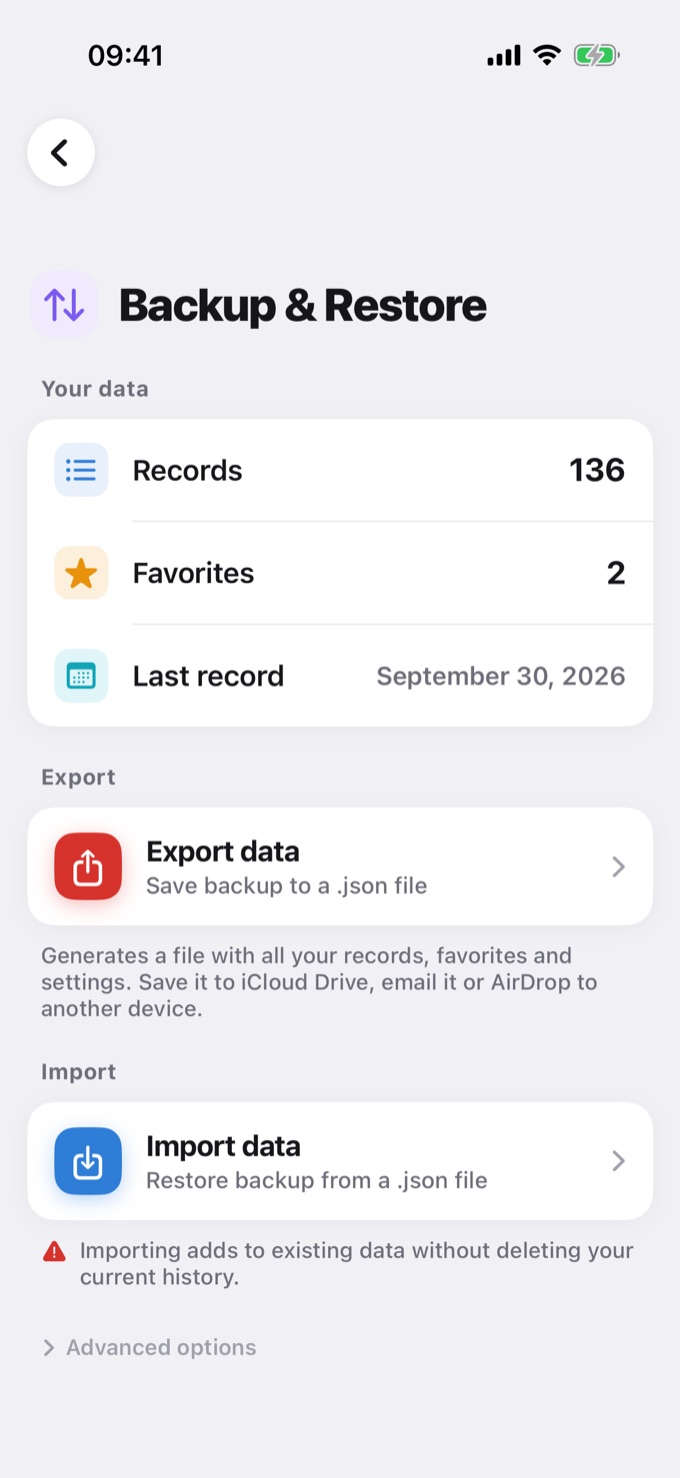
Create a backup
- Open Settings → Backup & Restore.
- Tap Export data.
- The app creates a
.jsonfile with your entries, favorites, and settings. - Choose where to save it: iCloud Drive, Google Drive, email, or another app.
Restore a backup
- Open Settings → Backup & Restore.
- Tap Import data and pick the
.jsonfile. - Check how many entries and favorites will be added and confirm.
Importing adds the data from the file to what's already in the app. Nothing in your current history is deleted.
What's in the backup
- All diary entries (glucose, foods, bolus, and the rest)
- Favorite foods and meals
- Profile and settings, such as your glucose range
Keeping the file safe
The backup file contains your health data as text (JSON). Keep it somewhere safe, like your iCloud Drive or Google Drive, and don't share it with others.
To move your data from an iPhone to an Android (or the other way around), see How to transfer your data between iOS and Android devices.