How to connect the Accu-Chek Guide Me meter
On Android, Diablesse connects directly to the Accu-Chek Guide Me glucose meter via Bluetooth. This way, the glucose readings taken on the meter are imported into your diary.
The direct meter connection is available only on Android. If you use an iPhone, see the What about iPhone? section below.
Step by step
- Go to Settings → Integrations.
- Turn on the Accu-Chek Guide Me toggle.
- Allow access to Nearby devices (Bluetooth) when Android asks.
- Keep the meter on and near your phone.
- Tap Sync now.
The readings will be imported and appear in your diary.
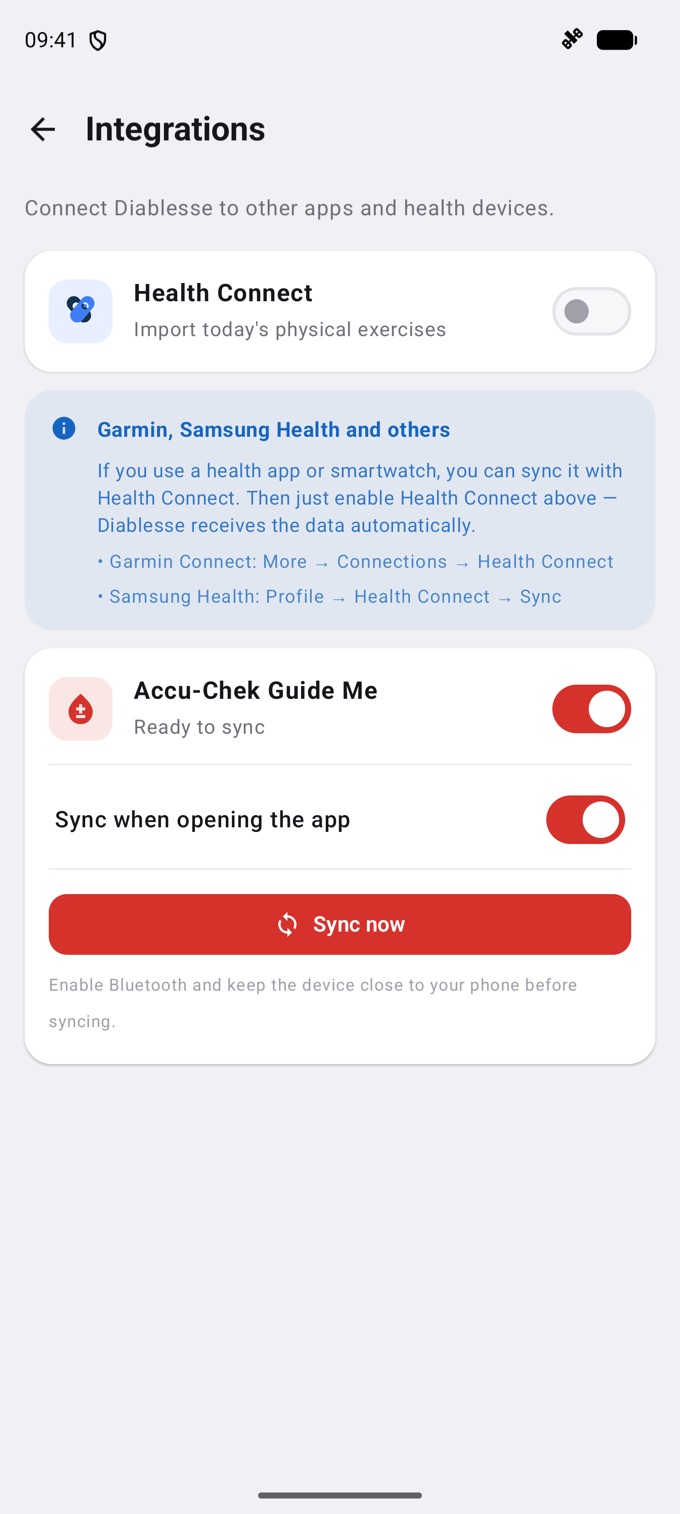
Sync when opening the app
Turn on Sync when opening the app so readings are imported whenever you open Diablesse with the meter nearby, with no need to sync manually.
What about iPhone?
On iPhone, Diablesse does not connect directly to the meter. You can:
- Use Apple Health: if your meter's official app sends glucose readings to Apple Health, turn on the Apple Health integration in Diablesse and the readings reach your diary. See How to connect Apple Health (iOS) and Health Connect (Android).
- Log manually: enter your glucose in a New entry.
Frequently asked questions
The meter isn't found. What should I do?
Check that your phone's Bluetooth is on, that the meter is on and nearby, and that you allowed Diablesse access to Nearby devices. Then try Sync now again.
Which devices are compatible?
Diablesse currently supports the Accu-Chek Guide Me, on Android.
I used Accu-Chek on my iPhone. What happened?
The direct meter connection was removed from the iPhone version. The readings you already imported stay in your diary. For new ones, use Apple Health or log them manually.
💡 If your meter shows an error code (such as E-1, E-2, or similar), see the article on Accu-Chek meter error codes.