Opened insulin expiration
After first use, every insulin has an expiration window that depends on the type (for example, 28, 42, or 56 days). Diablesse counts that window and alerts you before the insulin expires.
How to turn it on
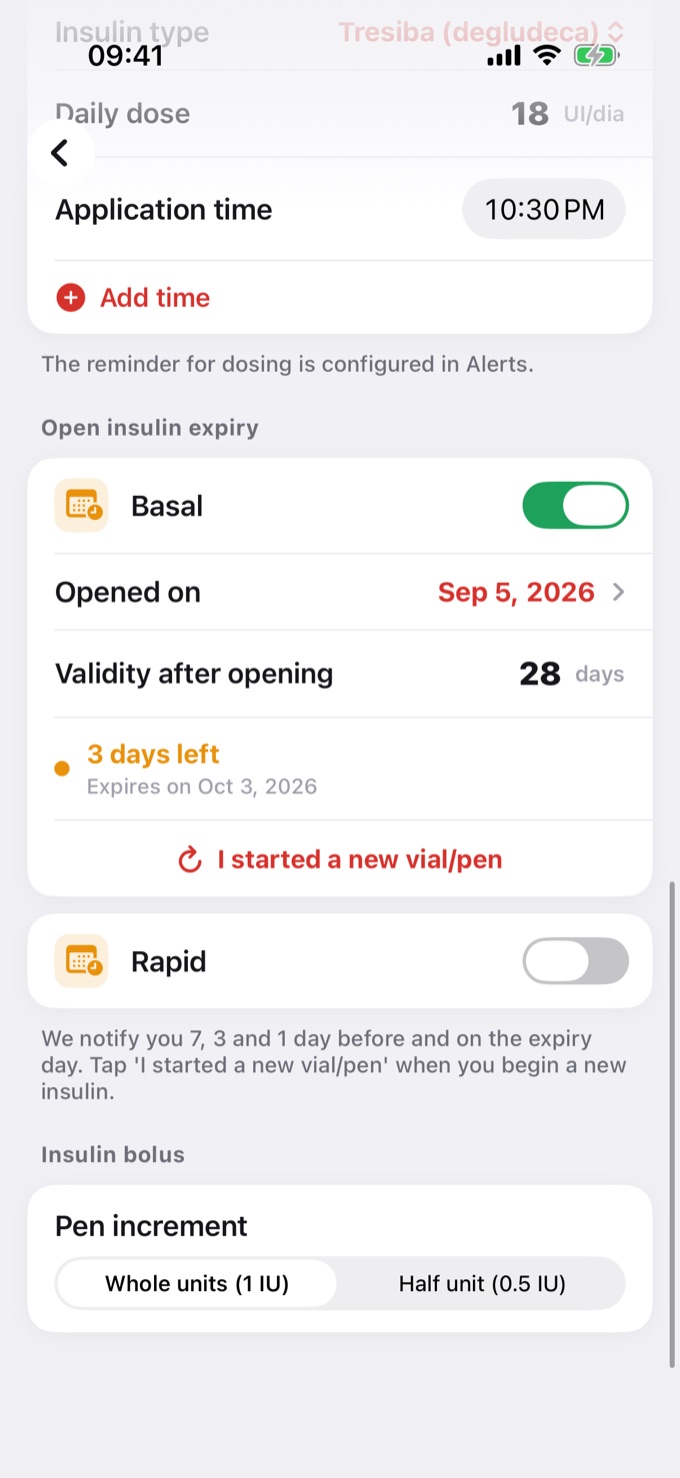
- Open Settings → Profile and scroll to Open insulin expiry.
- There are two independent controls: Basal and Rapid. Turn on the one you use.
- Under Opened on, enter the date you started the current vial or pen.
- Under Validity after opening, enter the number of days, as stated in your insulin's leaflet.
The app shows how many days are left and the expiry date, in green, orange when it's close, or red when it expires.
When you're alerted
You get notifications 7 days, 3 days, and 1 day before expiry and on the day itself. While it's close, the alert also shows up in Alerts at the top of the Diary.
On iPhone, these alerts are marked as time-sensitive and can show up even with a Focus mode on, just like medication reminders.
When you start a new insulin
When you open a new vial or pen, tap I started a new vial/pen. The count restarts from today and the alerts are rescheduled.
Your settings are kept
The expiry settings sync across your devices and are included in your backup. If you restore a backup or switch phones, tracking continues.
⚠️ Expiration windows vary by insulin type and manufacturer. Always check the leaflet and the advice of your doctor or pharmacist.