Alerts on the home screen
So you don't miss anything important, Diablesse shows an Alerts card at the top of your Diary whenever something needs your attention. That way, even if you miss the notification, the alert is right there when you open the app. Works on iPhone and Android.
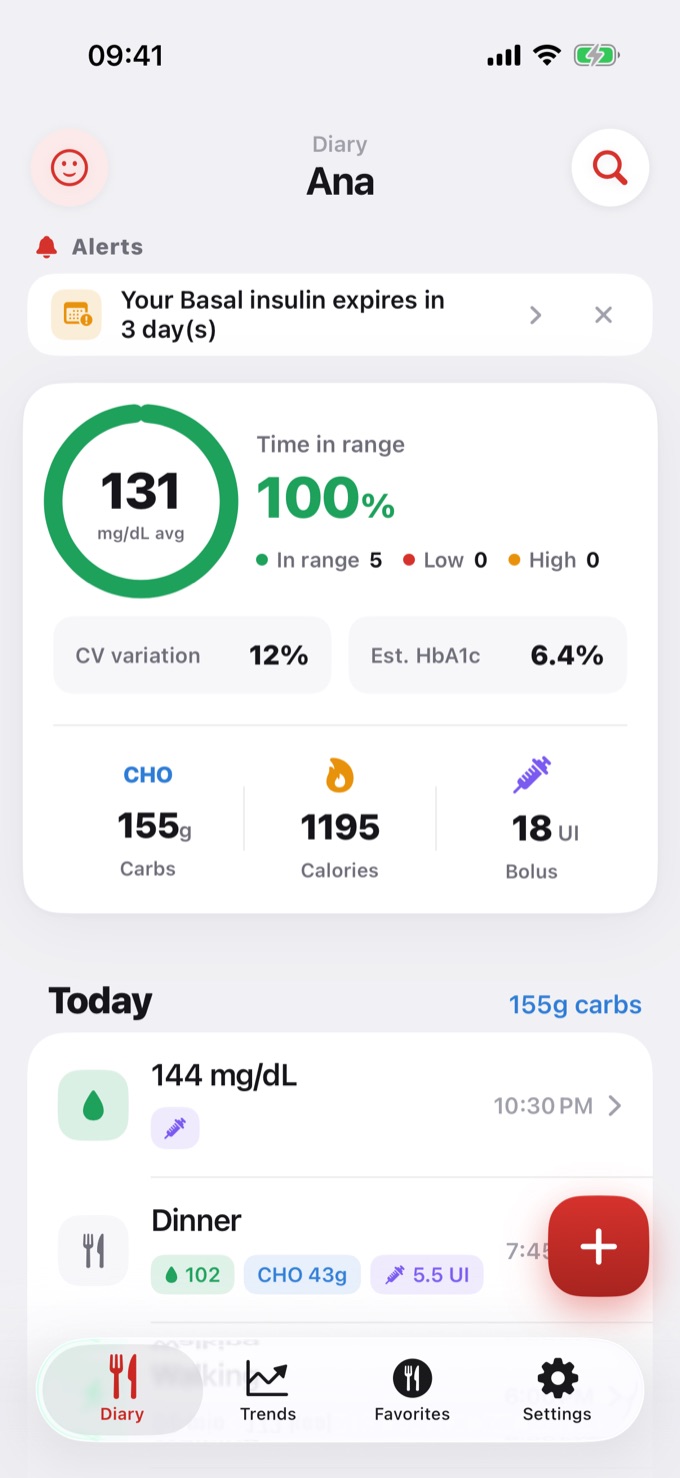
What shows up in Alerts
- Opened insulin expiration — when your basal or rapid insulin is close to expiring (within 7 days) or has already expired. Tap the alert to open your Profile and mark a new vial or pen.
- Today's medications — when a medication's scheduled time has passed and it hasn't been logged yet today.
The card is discreet: it only appears when something is pending. When there's nothing, it disappears on its own — and you're never required to log anything to clear it.
How to remove an alert
- Tap the ✕ on the alert to dismiss it. It goes away for the rest of the day and comes back the next day if the situation continues (insulin still expiring, medication still not taken).
- If you resolve the situation — renew the insulin or log the medication — the alert disappears on its own, with nothing else to do.
Meals and water
Meal and hydration reminders keep arriving as regular phone notifications. They do not appear in the Alerts card, to keep your home screen clean.
Frequently asked questions
Will the alert go away if I do nothing? On the same day, only by tapping the ✕. The next day it reappears if the situation still exists, and it goes away for good once you resolve it (renew the insulin or log the medication).
Why don't I see the card? Because nothing is pending right now — that's expected.
Can I see a history of past alerts? No. Alerts reflect what's pending right now; they don't keep a history.